


Hearts: Classic Card Game
4.71.14K Reviews
App Specs
- Version
- 1.3.17.20260703
- Updated On
- License
- Free
- Downloads
- 1,000,000+
- Developer
- Topy Games
- Categories
- Card
- Platform
- Android
Screenshots

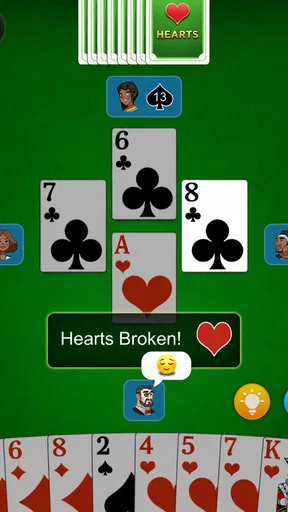
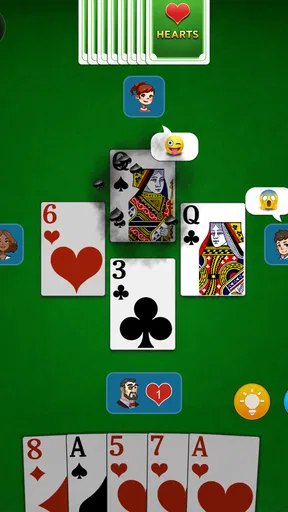
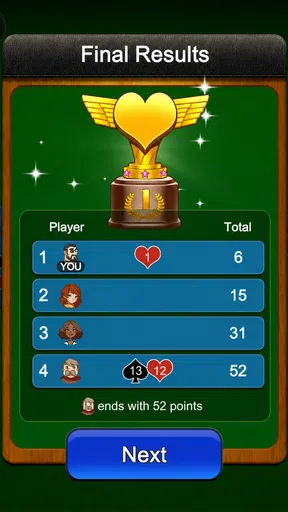
 Analysis by AppCompare
I like Hearts most when I want a game that rewards attention without demanding a long setup or a group of people around a table. This mobile version is built around the familiar trick-taking challenge: take care with what you play, avoid unwanted points, and try to read the other hands. Hearts: Classic Card Game has a 4.7 average from around 47,000 ratings, and its appeal is easy to understand if you already enjoy card games that mix planning with uncertainty.
A free game, with purchases to keep in mind
The game is free to install, and it is made by Topy Games. It is listed for Everyone and has more than a million installs, so it is clearly aimed at a broad audience rather than only experienced card players. The current version is 1.3.15.20260306, and it runs on Android 6.0 or later. The game also has in-app purchases priced at $9.99 per item. That is useful to know before downloading, even if you plan to play casually.
For me, the important distinction is between being able to start playing and choosing to spend. The basic appeal of Hearts is the decisions within each hand, not collecting extras, so I would approach the purchase options as optional rather than assume they are necessary. I would also check the purchase prompt carefully before confirming anything, particularly if a child will use the device. The Everyone rating makes the game broadly suitable for families, but it does not replace sensible purchase settings on a shared phone or tablet.
Gameplay and Features
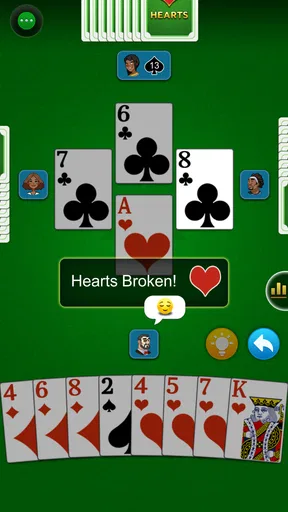
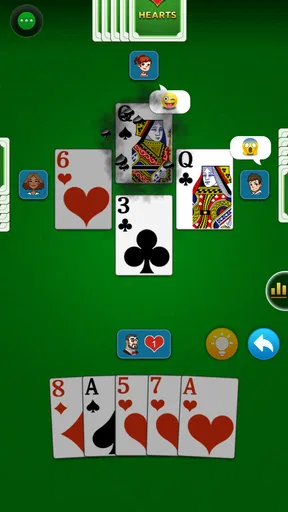
At its core, Hearts: Classic Card Game keeps things simple yet challenging. The main objective is to avoid collecting hearts and the dreaded Queen of Spades. If you’re new to Hearts, don’t worry, the app provides a brief tutorial to get you up to speed. The rules are easy to grasp, and after a few rounds, you'll find yourself strategizing like a pro.
The familiar rules make it straightforward to judge whether the game suits you: if you enjoy tracking which suits have appeared and weighing a risky play against a safe one, a hand can feel satisfying even when luck is not on your side. If you mainly want a quick reaction game or a puzzle with a guaranteed solution, Hearts may feel slower and less direct. The pleasure comes from making the best choice with incomplete information, not from controlling every outcome.
The app features a sleek and user-friendly interface. The cards are beautifully rendered, and the animations are smooth, which makes for a pleasant and engaging playing experience. One neat feature is the customizable difficulty settings, allowing you to play against AI opponents that suit your skill level. Whether you're a beginner or a seasoned player, you can find a challenge that’s just right for you.
Difficulty is worth treating as a practice tool, not just a way to make a match harder. When you are learning, a gentler setting gives you room to notice the consequences of leading a suit or holding back a high card. Once familiar decisions start to feel automatic, increase the challenge and pay closer attention to what the opponents appear to be protecting. A useful habit is to review your own choices after a hand: identify one trick where you could have avoided taking points, rather than blaming the result on a bad deal.
Worth Reading Before You Choose

Flipboard Shows What News Apps Must Do Beyond the Feed

Switching to Android Auto Means Rethinking Your Driving Routine

Google Calendar Makes a Crowded Week Easier to Manage

Ludo King Makes the Most of the Minutes Between Plans

Baby Panda World Brings Quick Play to Modern Phones, but Its Game Library Feels Busy

ESPN’s Live Game View Makes Following Close Games Easier
That kind of self-review also keeps the game enjoyable during a losing streak. Hearts contains chance, and one awkward hand can put you under pressure even when your choices are reasonable. I would not use a single score or match as a measure of skill. Instead, treat each round as a small lesson in timing and risk; the longer-term satisfaction is in making more deliberate decisions, not expecting every hand to go your way.
An aspect I particularly appreciated is the multiplayer mode. You can invite your friends to join a game or match with random players online. This not only adds a social element to the game but also enhances the competition. Playing against real people always adds an unpredictable twist, keeping the gameplay fresh and exciting.
Multiplayer is the better fit when the point is conversation or a shared contest, while the AI is more convenient when you have only a few minutes and do not want to coordinate with anyone. A realistic use is opening a solo hand during a quiet commute or while waiting for an appointment, then saving a friend match for a time when everyone can pay attention. I would choose a real-person game when I care about social unpredictability, but I would not rely on it as a guaranteed quick session: other players need to be available and willing to join.
Design and Usability
The design of the app is both modern and nostalgic. It's clear that the developers put a lot of thought into maintaining the classic feel of the game while adding a modern touch. The app is intuitive, and navigating through the menus is a breeze. The settings are straightforward, allowing you to tweak things like sound effects and notifications to match your preference.
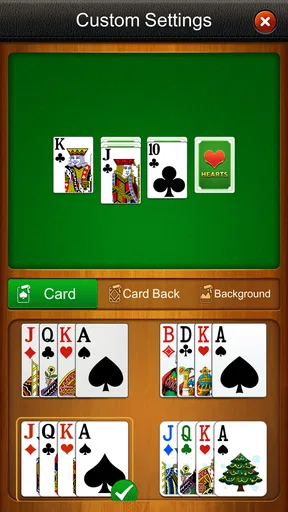
For a game built around small symbols and changing suits, comfortable viewing matters more than flashy effects. I would take a moment before a longer session to choose the card design and theme that are easiest for me to distinguish, rather than simply picking the most decorative option. That small adjustment can reduce misreads when a hand gets tense. Muting sound effects is another practical choice for playing in a waiting room or other quiet place; the game does not need audio to make the card decisions interesting.
One of the highlights is the visual customization options. You can choose from different themes and card designs, which allows you to personalize your gaming experience. This attention to detail makes the app not just a game, but a delightful experience.
Customization is pleasant, but it does not change the underlying strategy, so I would treat it as a comfort setting rather than a reason to keep switching styles. If you are still learning, settle on a clear, high-contrast design and keep it long enough to build familiarity. Changing the look repeatedly can make suit recognition less automatic, which is the opposite of what you want when you are trying to focus on the play.
Fair play, pressure, and alternatives
The game’s smart AI is a practical reason to choose it over a physical deck when no one else is around, and adjustable difficulty gives beginners a way to ease into the rules. Online play offers a different kind of challenge because human opponents make less predictable choices. Those are meaningful differences in the ways of playing described here, but they do not establish how matchmaking works or how online results are handled. I would judge an individual match by the cards and decisions I can see, rather than assume that an opponent’s surprising play proves anything about fairness.
Compared with another basic mobile Hearts game, the main question is not whether it has the most elaborate feature list; it is whether you want a familiar ruleset, AI practice, and the option of playing with people. If your priority is practicing alone, a single-player card game with adjustable opponents is the more convenient choice. If you want to read people you know and enjoy the social side, a physical deck or a friend match may be more satisfying. If you want a different kind of card challenge, a game with more direct head-to-head tactics may suit you better than Hearts’ cautious trick-taking rhythm.
There are trade-offs whichever way you play. AI makes it easy to start whenever you have spare time, but computer opponents cannot reproduce the social feel of a table with friends. Online opponents bring that human unpredictability, but a random match is not the same as choosing your own company. And while changing the difficulty can help you find an appropriate challenge, a setting that feels too easy may offer little practice, whereas a demanding one can make a casual session feel like work. I would choose the mode to match my mood instead of treating one as the definitive way to play.
Spending is another part of the fairness question, and the confirmed purchase detail is simple: items cost $9.99 each. That gives a clear price point for an item, but it does not tell me what each item contains or whether purchases affect the outcome of play. I would not infer a competitive advantage or a paywall from the price alone. For a player who wants a straightforward card game, the sensible approach is to enjoy the free access first and decide whether an optional purchase is worthwhile only after seeing what it offers in the app.
Performance and Accessibility
In terms of performance, Hearts: Classic Card Game runs smoothly without any noticeable lag or glitches. It's lightweight, so it won’t bog down your phone's memory. This is a definite plus, as nothing is more frustrating than an app that crashes mid-game. Whether you're playing on Android or iOS, you can expect a seamless experience.
Additionally, the app is quite accessible. It’s available in multiple languages, and the text is easy to read. For those concerned about in-app purchases, the game offers a balanced experience without constantly pushing you to make purchases. Ads are present, but they're not intrusive, so they won't detract from your overall enjoyment.
There are a few practical questions I would settle before making it a regular habit. If you need a game that works in a particular language, check the available language choices in the settings. If you want to play with friends, look at the available multiplayer options before planning a group session. And if you are choosing it for a child, pair the Everyone age rating with device-level purchase controls, since the game does have paid items. These checks are more useful than assuming every phone, network, or household setup will behave the same way.
The presence of ads is a real consideration even when they are not especially intrusive. Players who dislike any interruption may prefer a physical deck or a different app whose ad experience better fits their tolerance. On the other hand, if you mostly play a hand now and then, the free entry point may matter more than having a completely uninterrupted experience. I would try a short session in the situations where I actually expect to play—such as on a break—before deciding whether the balance feels comfortable.
One limitation of card-game apps generally is that a screen cannot reproduce the table talk, shared jokes, and pauses that make a face-to-face game memorable. This version offers online play, which helps if friends are not nearby, but it is still best thought of as a convenient way to play Hearts rather than a replacement for every social card night. Players who value company above the cards themselves may be happier arranging a real-world game.
Who will enjoy it, and who may want another game
I would recommend this to someone who already knows Hearts and wants an easy way to play without arranging a full table. It also suits a newcomer willing to learn through a short tutorial and repeated hands, especially someone who likes gradual improvement more than instant wins. The adjustable AI makes solo practice a sensible starting point; multiplayer is there for players who want the added uncertainty of human decisions.
I would skip it if I wanted a fast, high-energy game, a deep campaign, or a card experience with a strong narrative. Hearts is deliberately about the rhythm of a deal and the choices made within it. It can also be a poor fit for someone who finds losing to chance frustrating, or who does not want ads and purchase options in a free game. Those preferences do not make the app bad; they mean a different kind of entertainment is likely to feel more rewarding.
For an everyday example, I can see myself opening a solo game while waiting for a train, playing a hand or two, and stopping when my turn is called. In that setting, the AI and familiar rules are advantages because there is no need to gather people or remember a long sequence of objectives. At home with friends, I would take the multiplayer route if coordinating a match is convenient; otherwise, a physical deck is still the easier way to share the table and talk through the evening.
Final Thoughts
Overall, Hearts: Classic Card Game is a fantastic app that brings a beloved card game to your mobile device in a polished and engaging way. Whether you're playing solo against the AI or challenging friends in multiplayer, there's plenty to enjoy here. The combination of classic gameplay, modern design, and excellent usability makes it a must-have for any card game enthusiast.
My recommendation is more specific: it is a strong option if you want accessible Hearts, flexible practice against AI, and the possibility of online play, but it is not the best match for everyone who enjoys card games. Before spending, I would play for free, decide whether the available modes and ads suit my routine, and inspect any item offered for purchase rather than guessing what it does. The game is at its best when I treat each hand as a small strategic puzzle and accept that luck remains part of the deal.
So, if you're looking to kill some time or just want to relive some classic card-playing moments, give Hearts: Classic Card Game a try. It’s available for download on both Android and iOS, so grab your device, shuffle those virtual cards, and enjoy the game!
Pros
- Intuitive user interface for easy navigation.
- Multiple difficulty levels for all players.
- Offline mode available for play anywhere.
- Customizable card themes and backgrounds.
- Smooth performance with minimal lag.
Cons
- Ads can interrupt gameplay frequently.
- Limited multiplayer features restrict interaction.
- No in-depth tutorials for beginners.
- Requires frequent updates for bug fixes.
- Lacks advanced strategy guides for experts.
FAQs for Hearts: Classic Card Game
What are the basic rules of Hearts: Classic Card Game?
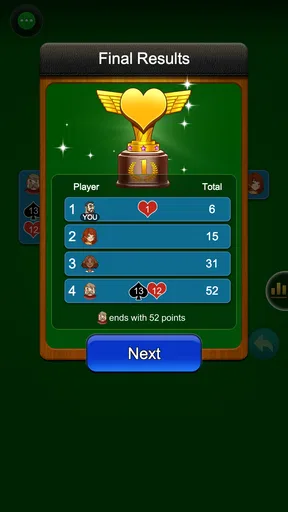
Hearts is a trick-taking game where the objective is to score the fewest points. Players must avoid collecting hearts and the Queen of Spades during tricks, as these increase your score. The game ends when a player reaches 100 points, and the player with the lowest score wins. It's essential to strategize and anticipate your opponents' moves.
Can I play Hearts: Classic Card Game offline?
Yes, Hearts: Classic Card Game offers an offline mode where you can play against computer-controlled opponents. This feature is perfect for practice or when you don’t have access to the internet. The AI opponents provide a challenging experience, simulating real player strategies.
Is there a multiplayer mode available?
Hearts: Classic Card Game includes a multiplayer mode that allows you to play with friends or other players online. You can either join existing games or create a private room to invite friends. This mode enhances the social aspect of the game, making it more interactive and engaging.
Are there any in-app purchases or ads?
The app offers a free version supported by ads, which might interrupt gameplay occasionally. However, there are in-app purchases available to remove ads and unlock additional features, such as custom card decks and themes. These purchases enhance your gaming experience but are not necessary to enjoy the core game.
What devices are compatible with Hearts: Classic Card Game?
Hearts: Classic Card Game is compatible with both Android and iOS devices. It requires Android version 4.4 or later and iOS version 9.0 or later. The game is optimized for both smartphones and tablets, ensuring a smooth and visually appealing experience across all devices.


